
Digital evidence is fragile. A single action like opening a drive or connecting a device to a computer can quietly change the data stored on it. Most people never notice these changes because they happen in the background. But in an investigation, even a small modification can raise serious questions about the integrity of the evidence.
This is where a write blocker becomes essential.
Think of a storage device as a crime scene. Investigators want to examine everything inside it without disturbing anything. If the system accidentally writes new data to the drive, timestamps may change, system logs may update, and small traces of activity may disappear forever.
A write blocker acts like a protective barrier between the evidence and the computer used for analysis. It allows investigators to read data from the device while preventing any new data from being written to it. In simple terms, it keeps the original evidence frozen exactly as it was found.
Understanding why a write blocker is used helps explain one of the most important principles in digital forensics. Investigators must observe evidence without altering it.
Without this safeguard, even well intentioned analysis could unintentionally change the very data investigators are trying to preserve. That is why write blocking technology has become a standard practice in professional digital investigations.
What is a Write Blocker?
A write blocker is a forensic tool that allows investigators to access data on a storage device without making any changes to the original evidence. It acts like a protective filter placed between the evidence drive and the computer used for analysis.
When a device such as a hard drive, SSD, or USB is connected to a computer, the operating system may automatically attempt to write small pieces of data. These can include system logs, indexing files, or timestamp updates. Most users never notice these background actions, but in digital investigations they can alter critical evidence.
A write blocker prevents those changes.
Think of it like examining an old document inside a glass display case. You can read every word clearly, but you cannot touch or modify the paper. The information remains exactly as it was preserved.
In practice, the tool allows the computer to read data from the storage device while blocking any commands that attempt to write, edit, or delete information. This ensures the original drive remains unchanged during the examination.
Because of this capability, the write blocker becomes one of the first tools used when investigators handle digital evidence. Before imaging a disk or analyzing files, they place this barrier between the evidence device and the forensic workstation.
This simple step protects the integrity of the investigation and ensures the evidence can be trusted later if the findings are questioned.
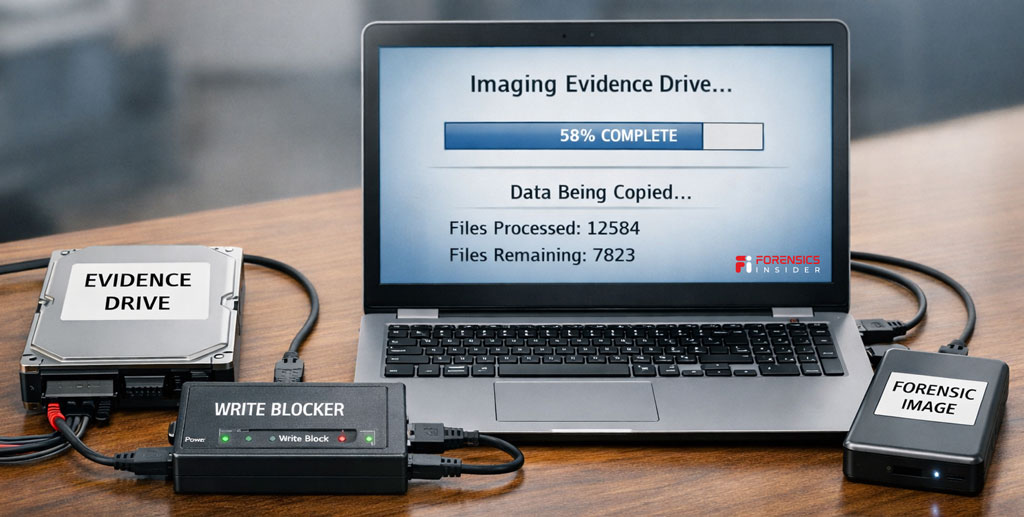
How Storage Devices Can Change Without You Noticing
Many people assume that simply connecting a storage device to a computer will not change anything. It feels like opening a book and reading the pages. But computers do not work that way.
Modern operating systems constantly interact with connected drives. The moment a disk, USB drive, or memory card is attached, the system begins scanning it. During this process, the computer may automatically create small system files, update timestamps, or adjust internal records.
These actions happen quietly in the background. Most users never see them.
For example, the operating system might update the “last accessed” time for files as it scans the drive. Some systems create indexing data so files appear faster in search results. Others generate temporary logs to track device activity.
From a normal user’s perspective, these changes are harmless. But in digital investigations, even a small modification can affect the reliability of evidence.
This is why investigators rely on a write blocker when examining storage devices. The device allows the computer to read data while preventing any commands that attempt to write new information to the drive.
Without a write blocker, the system itself could unintentionally alter evidence before the investigation even begins.
Think of it like walking through fresh snow at a crime scene. Every step leaves footprints. Even if you are careful, the scene changes the moment you enter.
In the same way, connecting a storage device without proper protection can quietly modify digital evidence before anyone realizes it.
Why Write Blockers are Essential in Digital Investigations?
Digital investigations depend on one simple rule. Evidence must remain exactly as it was found. If data changes during analysis, investigators may struggle to prove that the information truly reflects what existed on the device.
This is where a write blocker becomes critical.
When a storage device connects to a computer, the operating system often tries to interact with it automatically. The system may update timestamps, create hidden files, or record device activity in background logs. These actions are routine for normal computer use, but they can quietly alter evidence during an investigation.
A write blocker prevents those changes by allowing the computer to read data while blocking any command that attempts to write new information to the device. Investigators can safely examine files, copy data, and create forensic images without modifying the original storage media.
Think of it like examining an artifact in a museum. Visitors can observe it closely through protective glass, but they cannot touch or change it. The artifact remains preserved for future examination.
Another reason a write blocker matters is legal reliability. When digital evidence appears in court or internal investigations, investigators must show that the data was preserved properly. If the device was accessed without protection, the opposing side could argue that the evidence was altered during analysis.
By using a write blocker, investigators demonstrate that the original data remained untouched throughout the examination process.
In practice, this small device plays a huge role in protecting the integrity of digital evidence. It ensures investigators can explore the contents of a drive without accidentally changing the very information they are trying to uncover.
What Happens If a Write Blocker is Not Used?
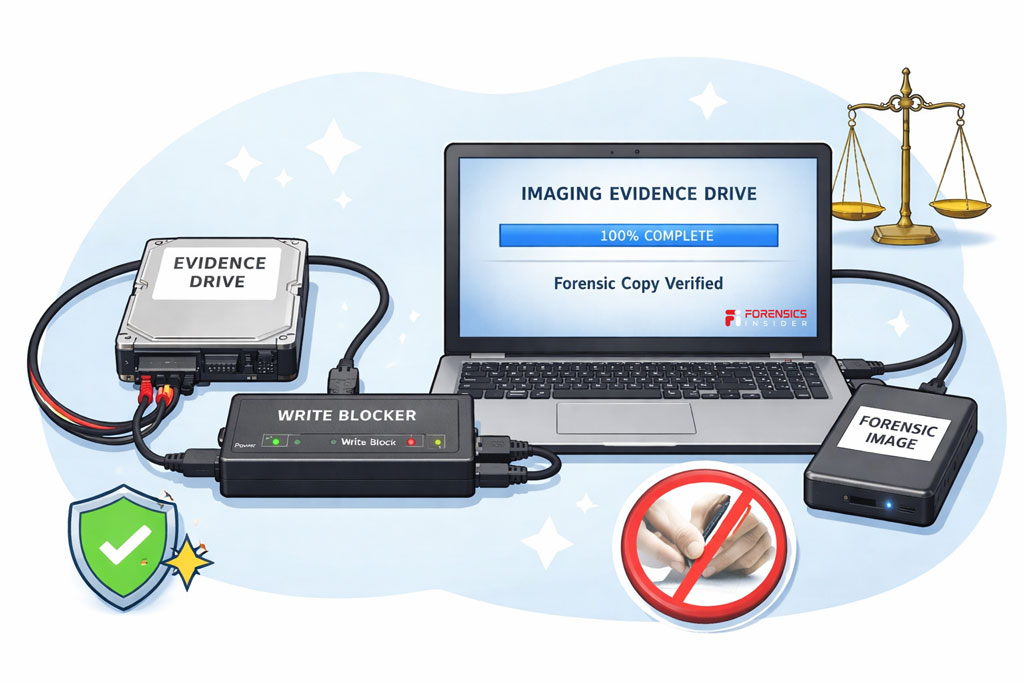
Skipping a write blocker during an investigation may seem like a small decision, but it can lead to serious problems. Even a simple act like connecting a storage device to a computer can trigger background changes that affect the evidence.
Modern operating systems interact with drives automatically. As soon as a disk or USB device is connected, the system may scan files, update timestamps, or generate hidden system records. These actions happen silently, and most users never notice them.
In a digital investigation, however, those small changes matter.
Without a write blocker, the computer might modify metadata such as “last accessed” times. That information is often used to reconstruct timelines during forensic analysis. If timestamps change, investigators could lose the ability to prove when certain files were opened or modified.
There is also a legal risk. Digital evidence must be preserved in its original condition. If investigators access a device without protection, the opposing side may argue that the evidence was altered during examination. Even if the changes were accidental, the credibility of the investigation can suffer.
Another problem is the potential loss of hidden data. Some system processes may overwrite parts of unused disk space while interacting with a drive. That space sometimes contains fragments of deleted files. If those fragments disappear, investigators may lose important clues.
A write blocker prevents these issues by acting as a safeguard between the evidence and the analysis computer. It ensures the device can be examined without any chance of writing new data to it.
In digital forensics, protecting the original evidence is just as important as analyzing it. Without that protection, investigators risk damaging the very data they are trying to preserve.
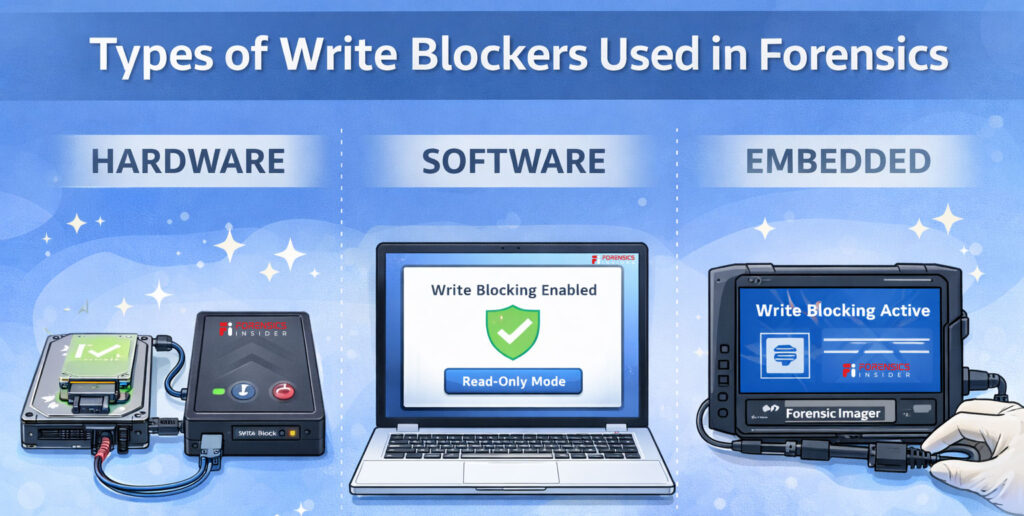
Types of Write Blockers Used in Forensics
Not all investigations involve the same type of storage device. Investigators may encounter traditional hard drives, SSDs, USB flash drives, memory cards, or even older legacy media. Because of this variety, different forms of write blocker tools are used in digital forensics.
Each type serves the same purpose. It allows data to be read from the evidence device while preventing any command that could write or modify information.
Let’s look at the most common types used during investigations.
Hardware Write Blockers
Hardware solutions are the most trusted option in professional forensic labs. A hardware write blocker is a physical device placed between the evidence drive and the forensic workstation.
The investigator connects the storage device to the blocker, and the blocker connects to the computer. The device then filters all communication between them. Read commands pass through normally, while any write commands are blocked automatically.
Because this protection happens at the hardware level, it provides strong assurance that the original data cannot be altered during analysis.
These tools support many storage formats such as SATA, IDE, USB, and NVMe drives, which makes them widely used in forensic imaging processes.
Software Write Blockers
In some situations, investigators use software based protection instead of dedicated hardware. A software write blocker works by controlling how the operating system interacts with a connected storage device.
The forensic software instructs the system to mount the drive in a read only mode. This prevents the computer from writing new data to the evidence media.
Software solutions can be useful in controlled environments or when hardware tools are not available. However, many investigators still prefer hardware solutions because they provide an extra layer of physical protection.
Embedded Write Blocking in Forensic Tools
Some forensic imaging platforms include built in write blocking capabilities. When investigators connect an evidence drive through the imaging system, the tool automatically restricts write access.
This type of write blocker is often used during the acquisition stage when investigators create a forensic image of a storage device. The built in protection ensures the imaging process does not alter the original data.
Why Multiple Types Exist?
Digital investigations deal with many types of devices and technical environments. Having different forms of write blocking tools allows investigators to adapt to each situation while still protecting the evidence.
Regardless of the method used, the goal remains the same. A write blocker ensures investigators can access data safely while keeping the original storage device unchanged.
Hardware vs Software Write Blockers
Investigators often choose between two main approaches when protecting digital evidence. Both methods aim to stop any modification of the original device, but they work in different ways. Understanding the difference helps explain why the write blocker is treated as such an important tool in digital forensics.
Think of it like locking a door. You can install a strong physical lock, or you can rely on software rules that control who can enter. Both provide protection, but one usually offers stronger certainty.
Hardware Write Blockers
A hardware write blocker is a physical device placed between the evidence drive and the forensic workstation. The storage device connects to the blocker, and the blocker connects to the computer.
This device filters communication at the hardware level. Read commands pass through normally so investigators can view and copy data. Any command that attempts to write, modify, or delete information is automatically blocked.
Because the protection happens outside the operating system, it is extremely reliable. The computer cannot bypass the restriction because the filtering occurs before the system even interacts with the drive.
For this reason, many forensic laboratories prefer hardware solutions when collecting digital evidence.
Software Write Blockers
A software write blocker works inside the operating system. Instead of using a physical device, the forensic software configures the system to mount the storage device in read only mode.
This prevents the computer from intentionally writing data to the drive during analysis.
Software methods are useful when investigators need flexibility or when hardware tools are not available. However, they rely on the operating system behaving correctly. If system settings change or the software fails, there is a small risk that write commands could reach the device.
Choosing the Right Approach
In most professional investigations, hardware solutions are considered the safer option. They provide an extra layer of protection because they operate independently from the computer system.
Software solutions still play a role in certain environments, especially during quick examinations or controlled lab conditions.
No matter which method is used, the purpose of the write blocker remains the same. It allows investigators to examine data without risking changes to the original evidence.
Tools Commonly Used With Write Blocker
A write blocker protects the original storage device, but investigators still need specialized tools to collect and analyze the data safely. These tools work alongside the blocker during imaging and forensic examination.
Think of the blocker as the safety barrier and the forensic software as the investigation toolkit. Together they allow investigators to examine evidence without altering the original device.
Here are some commonly used tools that work with a write blocker in digital investigations.
FTK Imager
One widely used tool is FTK Imager. Investigators use it to create forensic disk images from storage devices connected through a write protected interface.
The tool reads every sector of the drive and saves it into a forensic image file while generating hash values to verify integrity. When a write blocker is placed between the evidence drive and the forensic workstation, FTK Imager can safely capture the data without modifying the source device.
EnCase Forensic
Another well known platform in digital investigations is EnCase Forensic.
Investigators often use it to acquire and analyze forensic images. When used together with a write blocker, the software reads the storage media while the blocker prevents any accidental write commands.
This combination helps ensure the evidence remains unchanged throughout the acquisition process.
Autopsy
Autopsy is an open source forensic analysis platform used by investigators around the world.
While Autopsy mainly focuses on examining forensic images, those images are often created from devices connected through a write blocker. The tool helps investigators review files, timelines, internet history, and system artifacts while preserving the original evidence.
Magnet AXIOM
Another powerful investigation platform is Magnet AXIOM developed by Magnet Forensics.
This tool is commonly used to analyze digital evidence collected from computers, mobile devices, and cloud accounts. When imaging storage media through a write blocker, investigators later load that forensic image into Magnet AXIOM for deeper analysis.
Why These Tools Work Together?
A write blocker ensures the original drive cannot be modified, while forensic tools handle data acquisition and analysis. This combination allows investigators to safely collect evidence and explore it without risking accidental changes.
In digital forensics, the goal is not just to find information but to preserve it exactly as it existed. Using the right tools together makes that possible.
Best Practices When Using Write Blockers
Using a write blocker is a critical step in protecting digital evidence, but the tool alone is not enough. Investigators also follow careful procedures to ensure the device is used correctly and the evidence remains reliable throughout the investigation.
These best practices help maintain the integrity of the data while allowing investigators to examine the contents of a storage device safely.
Verify the Write Blocker Before Use
Before connecting any evidence device, investigators test the write blocker to confirm it is functioning properly. Many forensic labs run verification checks to ensure the device blocks write commands as expected.
This simple step prevents accidental data modification during the acquisition process. If the tool fails or is misconfigured, the evidence could be altered without anyone realizing it.
Connect Devices in the Correct Order
Proper connection order also matters. Investigators typically connect the write blocker to the forensic workstation first. After confirming the blocker is active, they attach the evidence drive to the device.
This ensures the storage media is protected the moment it becomes accessible to the computer. If the device were connected directly to the system first, the operating system might interact with it before protection is applied.
Document the Acquisition Process
Every step taken during evidence collection should be recorded. Investigators note the type of write blocker used, the device model, connection method, and the time the imaging process begins.
Detailed documentation supports transparency in the investigation. If the evidence is later reviewed in court or by another analyst, these records help demonstrate that proper procedures were followed.
Verify Hash Values During Imaging
When investigators create a forensic image, they generate cryptographic hash values for the data being copied. These hashes act like digital fingerprints.
Hash Analysis. Using a write blocker ensures the original drive is not altered during imaging, and the hash values confirm that the copied image is identical to the source data. If the hash values match, investigators can trust the integrity of the evidence.
Use Trusted and Tested Hardware
Professional investigations rely on well tested forensic equipment. A reliable write blocker should come from a trusted manufacturer and support the types of storage devices being examined.
Using verified hardware reduces the risk of compatibility issues and ensures the blocker can correctly filter write commands during the examination process.
Store Evidence Securely After Imaging
Once the forensic image is created, investigators disconnect the storage device and store it securely. The original media is preserved while analysis continues using the copied image.
This process ensures the write blocker protects the evidence during acquisition while the investigation proceeds using a safe working copy.
Following these practices allows investigators to maintain confidence in their findings. The goal is simple but essential. Access the data without changing it, and preserve the evidence exactly as it existed at the start of the investigation.
Real World Investigation Scenario
Imagine a situation inside a mid sized company. The security team suspects that confidential project files were copied from an employee’s computer before the employee resigned. The organization decides to begin a digital investigation to understand what actually happened.
The first step is to examine the employee’s workstation hard drive. But investigators know that connecting the drive directly to a computer could change the data. Even something as simple as the operating system scanning the drive might update timestamps or create system records.
To prevent this, the investigator places a write blocker between the evidence drive and the forensic workstation.
Once the drive is connected through the write blocker, the computer can safely read the data while the original device remains protected from any changes. This ensures that every file, timestamp, and system artifact stays exactly as it was when the device was collected.
The investigator then creates a forensic image of the drive. During the analysis of that image, several interesting clues appear. File access records show that a group of sensitive documents was opened late at night shortly before the employee left the company.
Further examination reveals that copies of those documents were transferred to a removable USB device. Even though the original files were later deleted, fragments of the deleted data still exist in unused areas of the disk.
Because a write blocker was used from the beginning, investigators can confidently demonstrate that the original evidence was never modified during the process.
In the final report, the forensic examiner presents a clear timeline showing when the files were accessed and copied. The company now has reliable digital evidence that helps them understand what occurred and decide on the next steps.
This scenario shows why protecting evidence at the very start of an investigation is so important. A simple tool like a write blocker can make the difference between questionable data and trustworthy digital proof.
Final Takeaway
Digital evidence can change faster than most people realize. Simply connecting a storage device to a computer can trigger automatic system activity that quietly modifies files, timestamps, or background records. In everyday computer use this is normal. In an investigation, it can damage the credibility of the evidence.
This is why a write blocker plays such an important role in digital forensics.
By placing this protective layer between the evidence device and the forensic workstation, investigators can safely read data without allowing any changes to occur. The storage media stays exactly as it was at the moment it was collected. That level of preservation helps investigators analyze information with confidence.
Throughout an investigation, the write blocker acts like a safeguard that protects the original source of truth. It ensures that forensic images are created from untouched data and that any findings are based on reliable evidence.
For digital investigators, the goal is not just to find information. The real challenge is proving that the evidence remained intact during the entire process.
A simple device like a write blocker helps make that possible. It protects the integrity of the investigation and ensures the story hidden inside digital data can be examined without altering the evidence itself.

Aswin Vijayan
Cybersecurity specialist and digital forensics researcher contributing practical guides, memory analysis tutorials, and investigation methodologies to ForensicsInsider.
View all articles by Aswin Vijayan →