
Anonymity on the internet often feels absolute. Install a browser, route traffic through layers of encrypted relays, and suddenly everything seems invisible. That’s the promise many users believe.
Here’s the thing. Technology rarely works in absolutes.
Tor Browser was built to protect privacy through onion routing. Traffic passes through multiple volunteer operated nodes before reaching its destination. Each layer hides the previous one. To the average user, that sounds like digital invisibility.
From an investigative perspective, it’s more nuanced.
Tor does not magically erase all traces. It minimizes persistence. It reduces identifiable network paths. And, It isolates sessions. But like any software, it interacts with an operating system. It creates processes. It loads libraries. And, It may leave configuration traces.
That is where Tor Browser Forensic Analysis begins. Not with assumptions, but with technical reality.
When performed correctly, Tor Browser Forensic Analysis focuses on identifying Tor Browser Forensics Artifacts across disk, memory, and system logs. These artifacts do not reveal everything. They rarely expose browsing history in plain text. What they can show is presence, usage patterns, configuration behavior, and sometimes timelines.
Think of it like investigating footprints in sand. Tor tries to smooth the surface after each session. But depending on the environment, weather conditions, and timing, impressions may still remain.
This guide walks through how investigators approach Tor in real cases. What can be recovered. What usually cannot. And why disciplined methodology matters more than dramatic assumptions.
What Is Tor Browser and How It Works
To understand Tor Browser Forensic Analysis, you first need to understand what Tor actually does under the hood.
Tor Browser is a modified version of Firefox designed to route internet traffic through the Tor network. The word Tor stands for The Onion Router. That name is not marketing. It describes the architecture.
Think of onion routing like sending a package inside multiple sealed envelopes. Each relay node removes one layer and forwards the package to the next stop. No single node knows both the origin and the final destination.
Here’s how it typically works
• Your device connects to an entry node
• Traffic is encrypted and passed to a middle relay
• It then moves to an exit node
• The exit node sends the request to the destination website
Each step uses layered encryption. That design hides the user’s IP address from the destination site and makes network tracing far more complex.
But anonymity at the network layer does not mean invisibility at the device layer.
The browser still runs as a process. It still loads libraries. It creates temporary session data. Also, It stores configuration settings. It interacts with the operating system just like any other application. Those interactions are where Tor Browser Forensics Artifacts can exist.
Tor is also built to reduce persistence. By default, it does not save browsing history between sessions. Cookies are isolated. Cache is minimized. Many traces are cleared when the browser closes.
What this really means is Tor protects identity at the network level. It does not guarantee zero forensic residue on the local machine. That distinction is critical before diving deeper into Tor Browser Forensic Analysis.
Why Tor Investigations Are Technically Challenging?
Investigating Tor use is rarely straightforward. That difficulty is not accidental. It is a design choice.
Tor was built to resist tracking, correlation, and long term data retention. From a forensic angle, that means fewer artifacts, shorter lifespans, and less context compared to traditional browsers.
Here’s the first challenge. Volatility.
Many Tor related traces live in memory or temporary storage. Once the browser closes or the system shuts down, those traces may disappear. If live acquisition is missed, the opportunity narrows fast.
The second challenge is intentional isolation.
Tor Browser separates sessions aggressively. Cookies are siloed. Cache is limited. History is wiped. This behavior reduces classic browser artifacts investigators often rely on, like persistent history databases or long lived cache files.
Then there is encryption layered on top of encryption.
Network traffic is wrapped in multiple cryptographic layers. Even if traffic is captured, content visibility is minimal. Timing and volume analysis may exist, but direct attribution becomes difficult without corroborating evidence.
Another complication is user behavior.
Many users run Tor from external drives, portable bundles, or inside virtual machines. Some pair it with privacy focused operating systems. Others combine it with VPNs. Each layer reduces artifact density and increases analysis complexity.
What this really means is Tor investigations are not about one smoking gun file. They are about small technical signals. Installation traces. Execution artifacts. Memory remnants. System interactions.
Tor Browser Forensic Analysis succeeds when investigators accept these limits and focus on correlation rather than certainty. That mindset shift is often the hardest part.
Acquisition Considerations
When it comes to Tor investigations, acquisition strategy can make or break the entire case.
Here’s the reality. If the wrong collection method is used, critical Tor Browser Forensics Artifacts may never be recovered.
The first major decision is live versus dead box acquisition.
If the system is powered on and Tor was recently active, memory capture becomes extremely valuable. RAM may contain active circuits, decrypted session remnants, running process data, and temporary artifacts that will disappear after shutdown. In many cases, Tor Browser Forensic Analysis benefits significantly from volatile memory capture before powering off the device.
If the system is already powered down, the focus shifts to disk imaging. A full forensic image should be created using validated tools. Bit by bit acquisition preserves deleted fragments, unallocated space, and system metadata that may contain residual Tor artifacts.
Documentation matters just as much as technical execution. Chain of custody, hash verification, and tool version recording are essential. Tor related cases often face scrutiny due to the anonymity factor. Methodology must be defensible.
Another key factor is understanding the environment. Was Tor installed normally? Run as a portable application? Executed from a USB drive? Used inside a virtual machine? Each scenario changes where Tor Browser Forensics Artifacts may reside.
Network logs, firewall data, and endpoint monitoring systems should also be considered during acquisition. Tor activity may leave traces beyond the local machine.
Think of acquisition like securing a fragile crime scene in the rain. Delay or mishandling can wash away the very evidence you are trying to preserve.
Strong Tor Browser Forensic Analysis begins long before artifact review. It begins with disciplined, strategic collection.
Key Tor Browser Forensics Artifacts
This is where things get practical.
When people hear Tor, they assume there is nothing to find. In reality, the browser still interacts with the operating system. Those interactions can leave traces. The key is knowing where to look. That is the core of effective Tor Browser Forensic Analysis.
Let’s break this down into the main artifact categories investigators examine.
Installation Directories
Even portable versions typically extract files somewhere on disk. Default installation paths, folder names, and application bundles can confirm presence. On Windows, that may include user download directories. On macOS and Linux, application folders and extracted archives often remain.
Profile Folders
Tor uses a modified Firefox profile structure. Inside the profile directory, you may find configuration files, extension data, and session related files. Even when browsing history is not preserved, structural artifacts can confirm usage.
Configuration Files
Files such as torrc and prefs.js can reveal user adjustments. Bridge configurations, security level changes, or custom proxy settings may appear here. These Tor Browser Forensics Artifacts help explain how Tor was configured, not just whether it was installed.
Cache and Temporary Data
Although Tor minimizes persistent storage, fragments may still exist in temporary directories or unallocated space. Partial downloads, thumbnails, or session remnants can sometimes be recovered depending on system behavior. So, extracting artifacts from browser cache may be a crucial evidence.
Download Traces
Files downloaded through Tor do not remain anonymous once saved locally. Downloaded content, metadata, and file system timestamps become standard forensic artifacts. In many investigations, this becomes more significant than browsing traces.
Crash Reports and Logs
Tor can generate internal logs and crash reports. These may confirm execution times and application behavior. During Tor Browser Forensic Analysis, even simple execution timestamps can support timeline reconstruction.
System Level Traces
Operating systems record application execution in various ways. Prefetch files on Windows, recent items lists, shortcut artifacts, and registry keys can indicate Tor usage. On macOS, plist files and system logs may provide similar confirmation.
What this really means is Tor reduces browser history. It does not eliminate system interaction.
Tor Browser Forensics Artifacts rarely give you a clean browsing list. Instead, they provide confirmation of presence, execution, configuration, and sometimes user action. When correlated carefully, those pieces can become powerful.
Tor Browser Forensic Analysis on Windows
Windows systems tend to leave more execution traces than users expect. That works in favor of investigators.
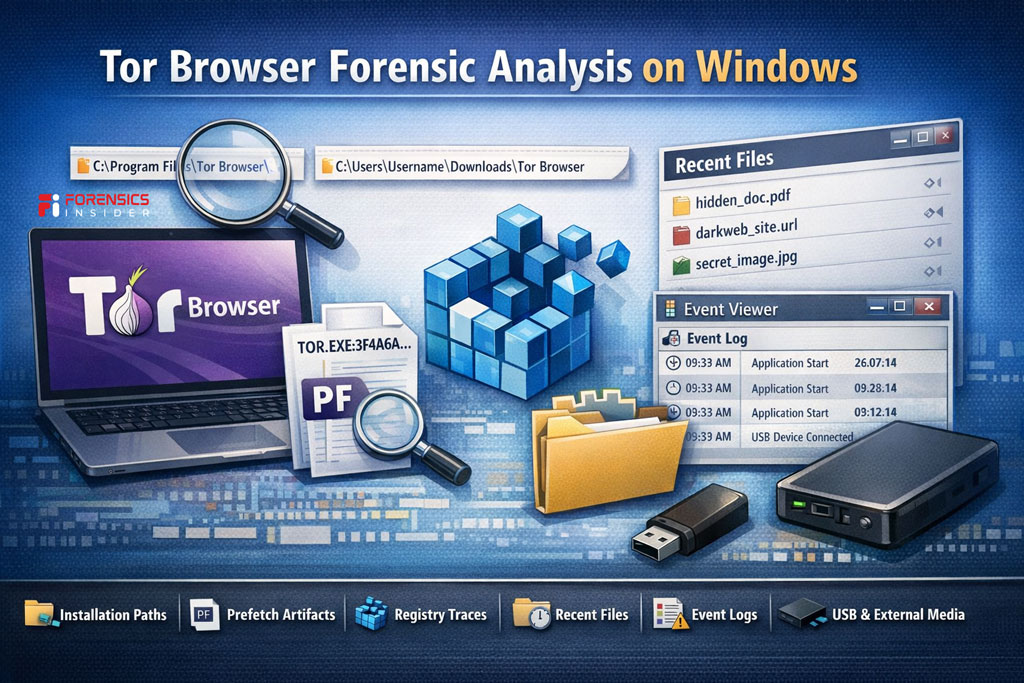
When performing Tor Browser Forensic Analysis on Windows, the first step is identifying how Tor was used. Was it installed normally? Extracted as a portable package? Run from a USB drive? Each scenario changes artifact locations.
Default Installation and Extraction Paths
Tor is often downloaded as a compressed archive and extracted into a user directory. Common locations include the Downloads folder or the Desktop. Even if deleted later, remnants may remain in unallocated space.
Inside the extracted folder, you will typically see the Browser directory structure and profile data. Presence alone confirms installation, but timeline artifacts add context.
Prefetch Artifacts
Windows Prefetch files can be extremely valuable. If enabled, the system creates a prefetch entry when an executable runs. A prefetch file associated with the Tor executable can confirm execution and sometimes show last run timestamps.
Registry Traces
Registry keys may reveal installation traces, file association entries, or execution history. UserAssist keys, for example, can indicate program execution. These registry artifacts often support findings discovered during Tor Browser Forensic Analysis.
Recent Files and Shortcuts
If a user downloaded content through Tor and opened it, Windows may generate recent file entries or shortcut artifacts. Even if the browsing session was private, post download behavior can leave traditional traces.
Event Logs
System event logs may record application crashes or system level events linked to Tor usage. While not always detailed, they can help anchor timelines.
USB and External Media Indicators
If Tor was run from removable media, Windows may retain device connection logs. Correlating USB artifacts with Tor execution traces strengthens investigative conclusions.
Here’s the practical takeaway. Tor limits browser persistence, but Windows itself records activity in multiple ways. Successful Tor Browser Forensic Analysis on Windows depends on correlating system level artifacts rather than expecting a visible browsing history.
Tor Browser Forensic Analysis on macOS
macOS behaves differently from Windows, but it still records system interactions in predictable ways. Tor reduces browser history. It does not eliminate operating system traces.
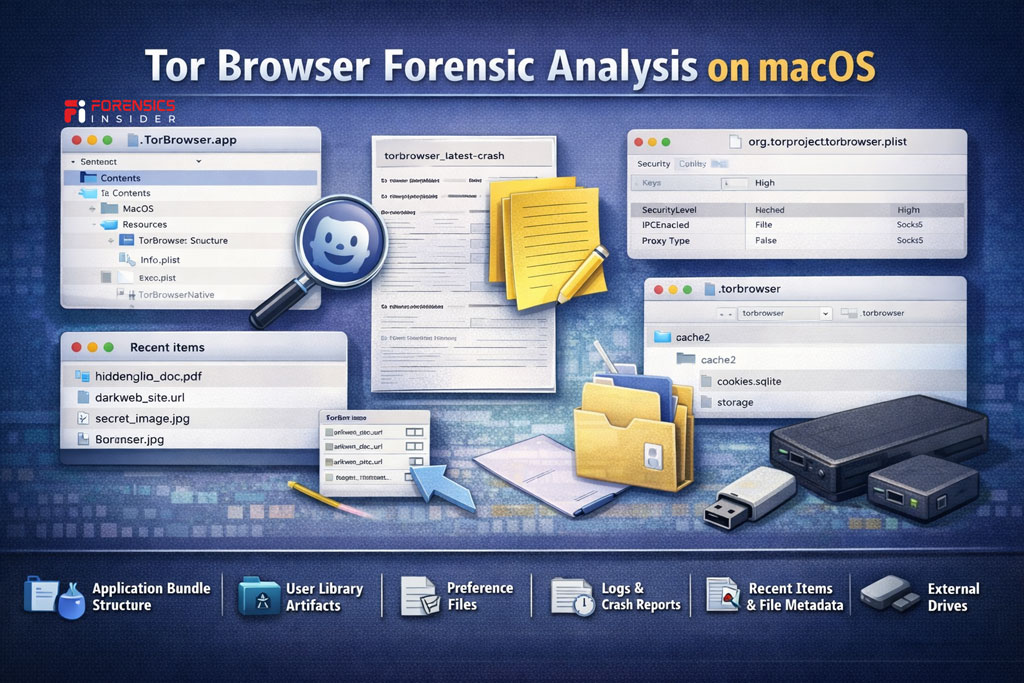
When conducting Tor Browser Forensic Analysis on macOS, start by identifying how the browser was deployed. Was it dragged into the Applications folder? Run directly from the Downloads directory? Executed from external media? Deployment method influences artifact persistence.
Application Bundle Structure
On macOS, Tor typically appears as an application bundle. Even if later deleted, remnants may remain in system caches or unallocated space. The bundle structure can confirm version details and installation timing.
User Library Artifacts
macOS stores application support data inside the user Library folder. Within Application Support and related directories, profile data or configuration remnants may exist. These Tor Browser Forensics Artifacts can confirm execution and environment settings.
Preference Files
Property list files, commonly known as plist files, may store execution details or user level configuration data. Even when Tor clears browsing history, macOS may preserve system level references.
Logs and Crash Reports
If Tor crashes or behaves unexpectedly, macOS can generate diagnostic reports. These logs may include timestamps and process identifiers. During Tor Browser Forensic Analysis, crash logs often help establish when the application was active.
Recent Items and File Metadata
If files were downloaded and opened, macOS may create metadata records or recent item entries. Once a file leaves the browser and enters the file system, it becomes a traditional forensic artifact.
External Drive Indicators
If Tor was run from removable storage, system logs may record device connections. Correlating those logs with Tor related timestamps strengthens conclusions.
The key point is this. macOS does not store a clear Tor browsing history. Instead, it records system interactions. Effective Tor Browser Forensic Analysis focuses on those indirect traces and builds the story through correlation.
Tor Browser Forensic Analysis on Linux
Linux environments add another layer of complexity. They are flexible, configurable, and often preferred by privacy focused users. That flexibility can reduce artifact consistency, which makes Tor Browser Forensic Analysis more method driven.
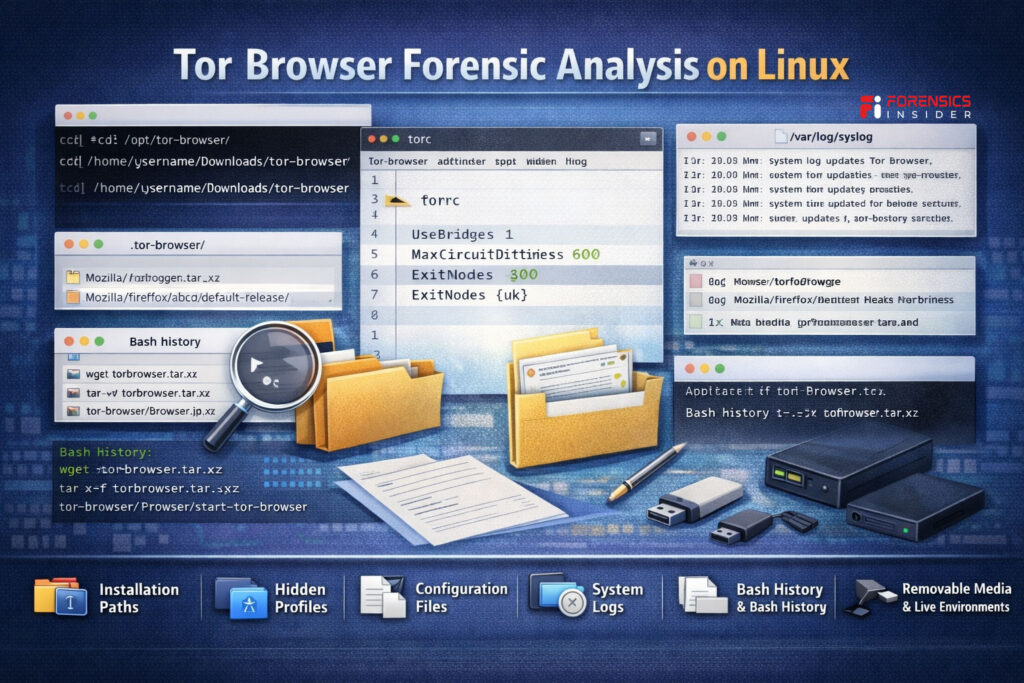
The first step is identifying the distribution and user profile structure. Unlike Windows or macOS, Linux does not follow a single standardized layout across all systems. Artifact locations may vary depending on the distro and user configuration.
Installation and Extraction Paths
Tor is commonly downloaded as a compressed archive and extracted into the user home directory. Even if deleted later, directory remnants may persist in unallocated space. Hidden folders inside the home path are especially important to examine.
Hidden Profile Directories
Linux stores many application related files in hidden directories that begin with a dot. Tor profile data, configuration files, and session remnants may reside here. These Tor Browser Forensics Artifacts often confirm usage even when browsing history is not preserved.
Configuration Files
Files such as torrc or browser preference files may reveal bridge settings, security level adjustments, or custom proxy configurations. Configuration artifacts help explain how Tor was used, not just whether it existed.
System Logs
Depending on logging settings, Linux systems may record process execution events. While often less detailed than Windows artifacts, logs can still assist in timeline reconstruction during Tor Browser Forensic Analysis.
Bash History and User Activity
If Tor was launched via command line, shell history files may record execution commands. This becomes especially relevant in advanced user environments.
Removable Media and Live Environments
Some users run Tor from external drives or privacy focused live systems. In such cases, local artifact density may be minimal. Correlation with external storage or network logs becomes more important.
The takeaway is simple. Linux does not automatically mean zero evidence. It means variability. Successful Tor Browser Forensic Analysis on Linux depends on understanding system structure and following the technical footprints left behind.
Memory Forensics and Tor
If disk artifacts tell you what happened in the past, memory tells you what is happening right now.
With Tor, that distinction matters. A large portion of useful data exists only while the browser is running. Once the system shuts down, much of it disappears. That is why memory acquisition can be a turning point in Tor Browser Forensic Analysis.
When Tor is active, RAM may contain running process details, loaded libraries, open connections, and fragments of decrypted content. The browser has to temporarily handle data in readable form before encrypting or transmitting it. Those short lived traces sometimes remain in memory long enough to be captured.
Investigators often look for active Tor processes, associated child processes, and network sockets. Process identifiers, execution paths, and memory mapped files can confirm real time usage. These findings can strengthen Tor Browser Forensics Artifacts discovered on disk.
Memory analysis may also reveal circuit information or connection patterns. While this does not automatically expose browsing content, it can demonstrate that Tor traffic was active during a specific window. That can be critical in timeline reconstruction.
Another important factor is encryption. Even though Tor traffic is encrypted on the network, data handled inside the browser must exist in decrypted form at some stage. In rare cases, fragments of URLs or session data can be recovered from memory dumps. Results vary widely, but the possibility makes RAM capture valuable.
Here is the practical reality. If a system is live and Tor is suspected to be running, delaying memory acquisition can cost evidence. Once powered off, that opportunity is gone.
Tor Browser Forensic Analysis often depends on seizing that narrow window when volatile data still exists. Memory does not wait.
Network Level Investigation
Disk and memory tell part of the story. The network can tell another.
Tor is built to obscure the path between user and destination. That makes direct attribution difficult. But difficult does not mean impossible. Network level work plays a supporting role in Tor Browser Forensic Analysis, especially in enterprise or monitored environments.
When Tor is active, a device connects to known entry nodes in the Tor network. These connections are encrypted, but their patterns can still be observed. Security appliances and firewalls may log outbound connections to Tor relay IP addresses. Even without seeing content, those logs can confirm Tor usage at specific times.
Traffic analysis becomes important here. Tor traffic often has recognizable characteristics. Repeated encrypted connections to relay nodes, specific port usage, and consistent session intervals can indicate Tor activity. Investigators do not see browsing history. They see communication patterns.
In controlled environments such as corporate networks, proxy logs or intrusion detection systems may record attempts to access Tor bridges or directory servers. Those entries become valuable Tor Browser Forensics Artifacts when correlated with system level traces.
Correlation is the key word. A firewall log showing connections to Tor relays at 9:12 PM, combined with a prefetch artifact or process execution record at the same time, strengthens the conclusion. Alone, each piece is weak. Together, they form a consistent picture.
There are limits. Exit node traffic blends with normal internet activity. Content remains encrypted. And users may layer Tor with VPNs, which complicates attribution further.
Still, network evidence can confirm that Tor was used, when it was used, and sometimes from which internal device. In many cases, that confirmation is enough to support broader Tor Browser Forensic Analysis findings.
Real World Investigation Scenarios
Theory is important. Real cases are where things become clear.
In one corporate investigation, an employee was suspected of leaking confidential data. Network logs showed repeated encrypted connections to known Tor entry nodes late at night. Disk analysis later revealed extracted Tor folders inside the user profile. During Tor Browser Forensic Analysis, prefetch artifacts confirmed execution on the same dates as the outbound connections. No dramatic browsing history was found. But the correlation was strong and defensible.
In another case, a suspect claimed they never accessed dark web marketplaces. The device had no visible Tor installation at first glance. However, unallocated space contained remnants of a deleted Tor directory. Registry traces confirmed prior execution. These Tor Browser Forensics Artifacts established historical presence even though the application had been removed.
There are also insider policy violation scenarios. Employees sometimes use Tor to bypass content filters or monitoring systems. Even when browsing data is unavailable, firewall logs and system artifacts together can confirm that anonymizing tools were actively used. That alone may violate policy.
In more serious criminal investigations, memory capture has revealed active Tor processes at the time of seizure. RAM analysis confirmed live circuits. That timing detail became critical in reconstructing activity windows.
Here is the pattern across cases. Tor rarely provides a neat, readable history. Instead, investigators piece together execution traces, configuration files, network logs, and memory artifacts.
Tor Browser Forensic Analysis works best when expectations are realistic. It is not about exposing every page visited. It is about proving usage, timeline alignment, and technical behavior in a way that stands up under scrutiny.
Limitations and Anti Forensics
This is where expectations need to stay grounded.
Tor was designed to reduce traceability. That design directly impacts Tor Browser Forensic Analysis. If you approach it expecting a clean browsing history database, you will be disappointed.
First, persistence is intentionally limited. By default, Tor does not retain session history after closure. Cookies are isolated. Cache is minimized. Many artifacts exist only during active execution. Once the browser closes, residue drops sharply.
Second, encryption creates natural boundaries. Network traffic is layered and protected. Even if captured, content visibility is restricted. At the device level, much of what Tor processes is temporary. That means Tor Browser Forensics Artifacts often confirm presence and usage, not specific browsing content.
Then there is deliberate anti forensics behavior by users. Some run Tor from portable drives. Others use virtual machines. Some pair it with privacy focused operating systems or combine it with VPN services. Each added layer reduces artifact density and complicates attribution.
There is also the risk of over interpretation. Just because Tor was installed does not mean criminal activity occurred. Just because a relay connection exists does not reveal what site was accessed. Overstating findings can weaken credibility in court.
Finally, timing matters. If memory is not captured while the system is live, volatile evidence is lost permanently. That limitation is technical, not investigative failure.
What this really means is Tor investigations require restraint. Tor Browser Forensic Analysis is about correlation and probability within technical limits. The goal is clarity, not certainty beyond what the evidence can support.
Reporting and Court Presentation
Finding artifacts is only half the job. Explaining them clearly is the other half.
Tor cases often sound dramatic before the evidence is even reviewed. Words like dark web and anonymity carry weight. That makes disciplined reporting essential. Tor Browser Forensic Analysis must be presented in a way that is factual, restrained, and easy to understand.
Start with clarity. Avoid technical overload. Judges and juries do not need deep protocol explanations. They need to understand what Tor is, how it works at a high level, and what your findings actually demonstrate. Simple analogies help. Onion routing can be described as layered forwarding where no single relay knows the full path. That level of explanation is usually enough.
Be precise about what the evidence shows. If Tor Browser Forensics Artifacts confirm installation and execution, say that clearly. If memory analysis shows active processes at a specific time, anchor it to a verified timestamp. Avoid implying browsing content unless it was actually recovered.
Visual timelines are powerful. Showing correlation between system artifacts, network logs, and file activity helps non technical audiences see patterns. When multiple independent traces align, the narrative becomes easier to follow.
Another key element is limitation disclosure. A strong report explains what cannot be determined. That transparency strengthens credibility. Courts tend to trust experts who acknowledge boundaries rather than stretch conclusions.
Finally, maintain neutral language. The presence of Tor does not equal guilt. It is a privacy tool with legitimate uses. Your role in Tor Browser Forensic Analysis is to explain technical facts, not assign motive.
Clear reporting turns complex artifact analysis into understandable evidence. That is what ultimately holds up under scrutiny.
Tools Used in Tor Browser Forensic Analysis
Tools do not solve cases. Investigators do.
But the right tools make disciplined analysis possible.
In Tor Browser Forensic Analysis, no single tool gives you everything. Disk artifacts, memory traces, registry entries, and network logs often require different platforms. The strength comes from correlation, not automation.
Here are the digital forensics tools commonly used in practice.
Autopsy
Autopsy is widely used for disk level examination. It helps identify installation folders, deleted directories, downloaded files, and timeline artifacts. When looking for Tor Browser Forensics Artifacts in user directories or unallocated space, this tool is often part of the workflow.
FTK
FTK supports detailed file system analysis and registry examination. It is particularly useful for identifying Windows execution traces, UserAssist entries, and keyword searches across disk images.
EnCase
EnCase is often used in enterprise or law enforcement environments. It provides structured analysis of file systems, system logs, and artifact parsing. In Tor related cases, it supports correlation across multiple evidence sources.
Volatility
Volatility is essential when memory capture is available. It allows investigators to analyze running processes, network connections, and in memory artifacts. Since Tor activity can be highly volatile, memory forensics sometimes becomes the strongest component of Tor Browser Forensic Analysis.
X-Ways Forensics
X Ways is known for precision and efficiency. It supports deep file system review, metadata analysis, and artifact recovery. Many investigators prefer it for manual artifact validation.
Here is the practical takeaway. Tools assist in locating Tor Browser Forensics Artifacts, but interpretation still depends on expertise. Automated parsing can identify files. It cannot decide what those files mean in context.
Strong Tor Browser Forensic Analysis uses tools as instruments, not conclusions.
Best Practices
Tor cases reward patience. Rushing leads to assumptions. Assumptions weaken findings.
Start with preservation. If the system is live and Tor may be active, prioritize memory capture before shutdown. Volatile data can contain the strongest Tor Browser Forensics Artifacts. Once lost, they are gone for good.
Work from verified forensic images. Hash everything. Document tool versions. Record timestamps carefully. Tor investigations often face scrutiny because anonymity is involved. Your methodology must be clean and defensible.
Build timelines early. Anchor Tor execution traces to system logs, network records, and file activity. Tor Browser Forensic Analysis becomes powerful when multiple independent artifacts align to the same time window.
Avoid tunnel vision. The presence of Tor is not proof of wrongdoing. Treat it as a technical finding, not a conclusion. Neutral language strengthens credibility.
Validate artifacts manually when possible. Automated parsing is helpful, but it can misinterpret context. Reviewing configuration files, profile structures, and execution traces directly ensures accuracy.
Finally, state limitations clearly in your report. Explain what the artifacts confirm and what they cannot confirm. Strong forensic work is transparent about boundaries.
Disciplined process always beats dramatic interpretation.
Conclusion
Tor was built to protect privacy. It reduces traceability at the network level and limits persistent browsing data. That design makes investigations more complex, not impossible.
Tor Browser Forensic Analysis is not about uncovering a clean browsing history. It is about identifying presence, execution, configuration, and correlation across systems. Tor Browser Forensics Artifacts often appear as small technical fragments. Installation traces. Process records. Network connections. Memory remnants.
On their own, those fragments may seem minor. Together, they can establish timelines and usage patterns that stand up to scrutiny.
At the same time, limits must be respected. Encryption, volatility, and user level anti forensics reduce visibility. Overstating findings damages credibility. Careful correlation strengthens it.
The real skill lies in restraint and structure. Collect correctly. Analyze methodically. Report clearly.
When handled with discipline, Tor investigations move from mystery to measurable technical reality.