At first glance, copying data sounds simple. You duplicate files, store them somewhere safe, and move on. For everyday users, that process is called a backup.
But in digital investigations, copying data is a much more careful process. The goal is not just to save files. The goal is to preserve every digital trace exactly as it exists.
This is where the difference between forensic copy and normal backup becomes important.
Think of a normal backup like packing important documents into a folder before moving to a new house. You take the files you care about and leave the rest behind.
A forensic copy works differently. It is more like photographing the entire room before anything is touched. Every detail is preserved, even things that might not look important at first.
For investigators, those small details often matter the most. Deleted files, hidden fragments of data, and system artifacts can reveal timelines, user actions, and traces of past activity.
That is why digital forensic professionals rarely rely on traditional backups during investigations. Instead, they create a complete forensic image that captures the full structure of the storage device.
Once you understand the difference between forensic copy and normal backup, it becomes clear why investigators treat digital evidence so carefully. One method focuses on convenience and recovery. The other focuses on accuracy and preservation.
What is a Normal Backup?
A normal backup is designed for one simple goal. Protect important data so it can be restored if something goes wrong.
Most people use backups without thinking much about the process. Phones sync photos to cloud storage. Laptops copy documents to external drives. Businesses run automated backups of servers every night.
In all these cases, the system selects useful files and saves them somewhere safe.
The key point is that a backup focuses on recovery, not investigation.
When a device is backed up, the system usually copies visible user data such as documents, images, application files, and settings. It does not attempt to preserve every hidden detail of the storage device.
That means several types of information are normally skipped. These can include deleted files, fragments of previously removed data, and unused areas of the disk. From a system recovery perspective, those areas are not important.
But from an investigative perspective, they can be extremely valuable.
What is a Forensic Copy?
A forensic copy is a complete and exact duplicate of a storage device created for investigative purposes. Instead of copying only visible files, it captures every bit of data on the drive.
Think of it like scanning every page of a book, including the blank pages, torn edges, and notes written in the margins. Nothing is skipped.
This approach is what separates a forensic acquisition from everyday data duplication. When professionals compare forensic copy and normal backup, the core difference is completeness. A backup focuses on usable files. A forensic image preserves the entire digital environment.
During this process, specialized tools read the storage device sector by sector. Each block of data is copied exactly as it exists. This includes active files, deleted files, temporary system data, and unused disk space where fragments of old data may still exist.
To prove the copy is authentic, investigators calculate cryptographic hash values before and after imaging. These hashes act like digital fingerprints. If even a single bit changes, the hash value changes too.
Because of this verification step, the forensic image becomes a trusted working copy. Analysts can examine it without touching the original device.
Understanding the difference between forensic copy and normal backup helps explain why investigators rely on forensic images. They are not just copying files. They are preserving digital evidence exactly as it existed at the time of collection.
For everyday users, this approach works perfectly. If a laptop crashes or a phone is lost, restoring the backup brings back the files that matter most.
For investigators, though, a standard backup often leaves out the digital clues needed to reconstruct past events.
Key Differences Between Forensic Copy and Normal Backup
At first glance, both processes sound similar. They both involve copying data from one place to another. But the purpose behind them is very different.
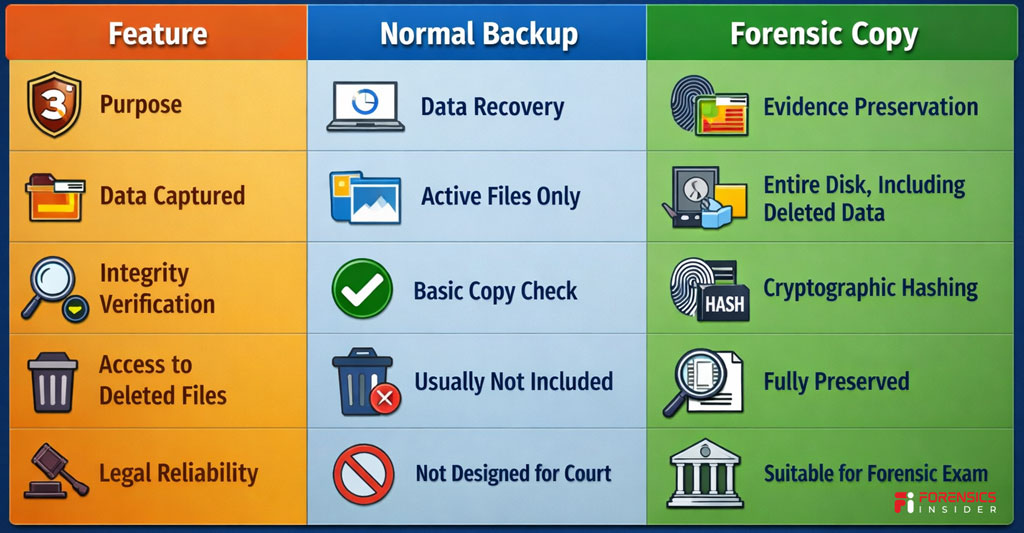
A normal backup focuses on recovery. A forensic copy focuses on evidence preservation.
Think of it like this. A backup is similar to saving important pages from a notebook so you can read them later. A forensic image is more like photographing every page, every mark, and even the blank spaces to preserve the entire record.
When professionals compare forensic copy and normal backup, several practical differences appear.
1. Scope of Data Captured
A normal backup usually copies visible and active files. Documents, photos, application data, and system settings are typically included.
A forensic copy captures everything on the storage device. This includes deleted files, file fragments, hidden partitions, and unused disk space that may still contain recoverable data.
This difference matters during investigations because deleted evidence can still exist in those unused areas.
2. Data Integrity Verification
In a standard backup process, the system mainly checks whether files copied successfully. There is usually no cryptographic verification.
A forensic image uses hash values such as MD5 or SHA to confirm that the copy is identical to the original storage device. These hashes act like a digital fingerprint. If the data changes even slightly, the fingerprint changes too.
That integrity check is one reason investigators clearly separate forensic copy and normal backup procedures.
3. Legal Admissibility
Normal backups are not designed to stand up in court. They help restore data after crashes, accidental deletion, or hardware failure.
A forensic copy is created following strict procedures so the data can be examined and presented as evidence. Chain of custody, verified imaging tools, and integrity checks all support this process.
4. Access to Deleted and Hidden Data
Backups usually ignore deleted files because the system sees them as removed.
A forensic copy preserves those deleted records along with remnants left in unallocated space. Investigators often recover messages, documents, or browsing traces from these areas.
This is another major point in the discussion of forensic copy and normal backup methods.
5. Purpose of Use
A backup protects information from loss. Businesses and individuals rely on it to restore systems quickly.
A forensic image is created for analysis. Digital investigators use it to reconstruct events, trace activity, and examine evidence without modifying the original device.
Quick Comparison Snapshot
Why Forensic Copies Matter in Investigations?
Digital investigations often start with a simple rule. Never work directly on the original device.
Phones, laptops, and storage drives constantly change their data. Opening a file, launching an app, or even connecting a device to a computer can modify timestamps and background records. For an investigator, that small change can affect the reliability of evidence.
That is where a forensic copy becomes critical.
When professionals examine forensic copy and normal backup processes in investigations, the main difference is preservation. A forensic image freezes the exact state of the storage device at a specific moment in time. Nothing is altered, and nothing is lost.
Preserving the Original Evidence
In legal investigations, the original device is treated like a crime scene. Investigators avoid touching it more than necessary.
A forensic copy allows experts to analyze the data safely while the original device remains sealed and preserved. If questions arise later, investigators can always return to the untouched source.
This careful approach is one reason the distinction between forensic copy and normal backup becomes important in legal contexts.
Recovering Hidden and Deleted Data
Many important clues are not visible on the surface. Deleted messages, removed documents, and temporary files often remain hidden in unused sections of a storage drive.
Because forensic imaging captures the entire disk structure, investigators can recover traces that normal file copies would miss. Even fragments of deleted data can help reconstruct a timeline.
Maintaining Evidence Integrity
Courts require proof that digital evidence has not been modified during analysis.
Forensic images include cryptographic hash values that act like digital fingerprints. When investigators analyze the image later, they compare the hash values to confirm the data remains identical to the original capture.
This level of verification is something a regular backup does not provide.
Supporting Timeline Reconstruction
Digital activity leaves behind small traces. File timestamps, application logs, browsing records, and system artifacts all contribute to understanding what happened on a device.
By examining a forensic image, investigators can reconstruct user activity without altering the evidence. This helps build a reliable narrative during an investigation.
Protecting the Investigation Process
Working on a forensic image also protects the investigation itself. Multiple experts can analyze copies of the same image independently. Their findings can be verified and reproduced, which strengthens credibility.
When comparing forensic copy and normal backup, this reproducibility becomes a major advantage in digital forensics.
The Bigger Picture
In modern investigations, data is often the silent witness. Phones, computers, and cloud accounts store records of communication, movement, and behavior.
A forensic copy ensures that those records are preserved exactly as they existed. That single step allows investigators to analyze evidence safely, verify findings, and present reliable conclusions when the case reaches court.
Real World Example of the Difference
Imagine a situation many investigators face today. A company suspects that sensitive documents were leaked by an employee. The employee’s office computer becomes part of the investigation.
At first glance, copying the files might seem enough. But the difference between forensic copy and normal backup quickly becomes clear when investigators begin the process.
Scenario One. Normal Backup Approach
An IT administrator creates a standard backup of the computer. Important folders like Documents, Downloads, and Desktop are copied to another drive.
This backup contains visible files. Reports, spreadsheets, presentations, and images all appear exactly as they were stored.
But something important is missing.
Normal backups rarely capture deleted data, system artifacts, temporary files, or hidden fragments stored in unused disk sectors. If the employee deleted the leaked documents before the investigation started, those traces may never appear in the backup.
This is one reason the distinction between forensic copy and normal backup matters in real cases.
Scenario Two. Forensic Copy Approach
Now imagine the same device handled by a digital forensic examiner.
Instead of copying only visible folders, the examiner creates a complete disk image using forensic imaging tools. The process captures every sector of the storage drive, including active files, deleted fragments, and hidden metadata.
Later during analysis, investigators discover something interesting.
Fragments of a deleted spreadsheet appear in the unallocated space of the disk. Email cache files reveal that the document was sent externally before being deleted. System timestamps show when the file was created, modified, and removed.
None of this information would normally appear in a regular backup.
What This Example Shows?
This simple scenario highlights the real impact of forensic copy and normal backup decisions.
A backup focuses on recovery. Its goal is to restore working files if something breaks.
A forensic copy focuses on truth. It preserves every trace so investigators can reconstruct events without altering the original evidence.
Why Investigators Choose Forensic Imaging?
In legal or corporate investigations, missing a single detail can change the outcome of a case.
By creating a forensic image first, investigators ensure they are working with a complete and verifiable snapshot of the device. From there, analysis becomes safer, more thorough, and far easier to defend if the findings are questioned later.
In the world of digital evidence, that difference often determines whether hidden data stays buried or becomes the key piece of the story.
Common Misconceptions About Backups and Forensic Copies
When people first hear the terms forensic copy and normal backup, they often assume both mean the same thing. After all, both involve copying data from one place to another.
But here’s the thing. In digital investigations, the purpose of the copy matters more than the act of copying itself.
Over time, a few common misunderstandings have spread around IT teams, businesses, and even legal discussions. Let’s clear them up.
Misconception 1
A backup can be used as forensic evidence
Many people believe that if files are backed up, investigators can simply analyze that backup during an investigation.
In reality, a normal backup is designed for recovery, not evidence preservation.
Backup systems usually copy active files only. They may skip hidden system areas, deleted data, or fragments stored in unused disk space. During an investigation, those missing pieces often contain the most important clues.
That is why the distinction between forensic copy and normal backup matters when evidence must stand up to scrutiny.
Misconception 2
A forensic copy is just a more detailed backup
This sounds logical but it is not accurate.
A forensic image does more than collect files. It captures the entire storage medium at the sector level. That includes deleted files, slack space, and system metadata that normal backup tools ignore.
Think of it like photocopying a few pages from a book versus scanning the entire book cover to cover, including blank pages and hidden notes.
Misconception 3
Backups preserve all timestamps and metadata
Backup tools sometimes change file timestamps or reorganize data structures during the copying process. Even small changes can affect how events are reconstructed later.
In contrast, forensic imaging tools preserve the original structure exactly as it exists on the disk. Investigators can later verify integrity using cryptographic hash values.
This level of verification is a key difference between forensic copy and normal backup in professional investigations.
Misconception 4
Forensic copies are only used by law enforcement
Another common belief is that only police or government agencies need forensic imaging.
In reality, companies frequently use forensic images during internal investigations, intellectual property disputes, employee misconduct cases, and cybersecurity incidents.
Corporate security teams, digital forensic consultants, and incident response specialists rely on the same approach.
Misconception 5
If a file is deleted, it cannot be recovered anyway
People often assume that once a file is deleted, the data disappears completely.
In many cases, the operating system simply marks the space as available while the underlying data remains on the disk until it is overwritten. A forensic image preserves those areas so investigators can attempt recovery later.
This is another reason professionals choose forensic imaging rather than relying on backups alone.
The Real Lesson
Backups and forensic images serve very different goals.
A backup protects business continuity.
A forensic image protects the truth behind digital events.
Understanding that difference helps organizations respond properly when incidents occur. It also ensures that critical evidence is preserved before routine system processes accidentally erase it.
Tools Used to Create Forensic Copies
If a digital investigation were a medical examination, the forensic image would be the X ray of the device. It captures everything without touching the original evidence. But that level of accuracy only comes from using the right tools.
Professionals rely on specialized software and hardware when creating a forensic copy and normal backup is not enough for investigative work. These tools are designed to duplicate storage media bit by bit while preserving every trace of data.
Let’s walk through the most commonly used ones.
EnCase Forensic Imager
One of the most widely known tools in digital investigations is EnCase Forensic.
Investigators use it to create forensic disk images that capture every sector of a drive. The tool also generates cryptographic hash values during acquisition. These hashes work like digital fingerprints that confirm the copy has not changed.
In cases where the difference between forensic copy and normal backup becomes important, EnCase ensures the copied evidence can be verified later in court.
FTK Imager
Another widely used option is FTK Imager, developed by AccessData.
This tool allows investigators to create a forensic disk image from hard drives, USB devices, and memory cards. It can capture data in formats such as E01 while preserving metadata and disk structure.
FTK Imager is often used during the first stage of investigations because it is reliable and straightforward to operate.
Magnet ACQUIRE
Modern investigations increasingly involve smartphones and removable devices. That is where Magnet ACQUIRE comes in.
Built by Magnet Forensics, this tool helps investigators capture forensic images from computers, mobile devices, and external drives.
It also performs automated hashing and documentation during acquisition. This ensures the image remains defensible if the investigation later enters a legal process.
Guymager
For investigators working in open source environments, Guymager is a powerful option.
It is widely used in Linux based forensic workflows and is known for its speed and reliability. Guymager performs sector level imaging while generating hash values to confirm the integrity of the copy.
Many forensic labs use it when they want a transparent and efficient imaging process.
Hardware Write Blockers
Software alone is not always enough. Investigators also rely on hardware devices called write blockers.
A well known example is CRU WiebeTech USB WriteBlocker.
These devices allow investigators to read data from a storage drive without any chance of modifying it. In simple terms, they act like a protective barrier between the evidence and the analysis system.
This protection is essential when creating a forensic image. Even a small accidental change could affect the integrity of the evidence.
Why These Tools Matter?
Creating an image in a digital investigation is not the same as copying files from one folder to another.
Specialized forensic tools capture the full structure of a disk, record verification hashes, and document the acquisition process step by step. That is why professionals rely on them when the difference between forensic copy and normal backup becomes critical.
The result is a reliable forensic disk image that investigators can analyze safely while the original device remains untouched.
Best Practices When Handling Forensic Copies
Creating an image of a device is only the first step in an investigation. What happens after that matters just as much. A forensic image can lose its evidentiary value if it is handled carelessly. That is why investigators follow strict procedures once the acquisition is complete.
These practices ensure the integrity of the forensic copy and normal backup distinction remains clear throughout the investigation.
Always Work on the Copy, Never the Original
Think of the original device as a sealed piece of evidence. Once the imaging process is complete, investigators store the original media safely and avoid touching it again.
All analysis takes place on the forensic image. This approach protects the evidence from accidental modification and preserves the original data exactly as it was found.
It also reinforces the difference between forensic copy and normal backup, because the forensic image becomes the working environment for examination.
Verify Hash Values Immediately
Every forensic image should be verified using cryptographic hash values such as MD5 or SHA256.
A hash value works like a digital fingerprint. If even a single bit of data changes, the hash will no longer match. Investigators calculate the hash during acquisition and then verify it again before analysis.
This step confirms that the forensic image remains identical to the original source.
Maintain a Clear Chain of Custody
Evidence must be traceable at every stage. Investigators document who collected the device, who created the image, where the evidence is stored, and who accessed it during analysis.
This documentation forms the chain of custody. Courts often rely on this record to ensure the evidence was not tampered with.
Without a proper chain of custody, even a technically accurate forensic image can face challenges during legal proceedings.
Store Forensic Images Securely
Forensic disk images can contain sensitive information such as personal data, corporate records, or confidential communications.
Because of this, investigators store images in secure environments with restricted access. Encryption and controlled storage systems are often used to protect the evidence.
These measures ensure that the data remains protected throughout the investigation.
Keep Detailed Acquisition Notes
Every step of the imaging process should be documented. This includes the tools used, the system environment, hash values, date and time of acquisition, and the storage location of the image.
These notes help investigators explain their process later. They also demonstrate that the procedures followed professional forensic standards.
When explaining the difference between forensic copy and normal backup, this documentation often becomes the strongest proof that proper forensic methods were followed.
Preserve Multiple Copies for Safety
Investigators usually create more than one forensic image. One copy is used for analysis while another remains preserved as a master reference.
This approach ensures that even if the working copy becomes corrupted or altered during analysis, a verified original image still exists.
Why These Practices Matter?
Digital evidence can be powerful in investigations, but only when its integrity is preserved. Handling forensic images with care ensures that the data remains reliable from the moment it is acquired to the moment it is presented in court.
Following these practices protects the investigation and keeps the difference between forensic copy and normal backup clear and defensible.
Final Takeaway
Digital data can look simple on the surface. Copy a file, move a folder, back up a device. But when that data becomes evidence, the rules change. The difference between a forensic copy and normal backup suddenly becomes critical.
A normal backup focuses on convenience. It protects files so they can be restored later if something goes wrong. Many backups skip deleted files, hidden system data, and low level disk information. That works perfectly for everyday use, but it does not preserve the full digital story of a device.
A forensic image works differently. It captures the entire storage medium bit by bit. Every file, deleted fragment, timestamp, and hidden structure is preserved exactly as it existed at the moment of acquisition. That complete snapshot becomes the foundation for a reliable Forensics Disk Image File used in investigation and analysis.
Think of it like photographing a crime scene. A quick phone photo might show the general layout. A forensic photograph records every detail in high resolution so investigators can study it later without losing context. The same idea applies to the difference between forensic copy and normal backup in digital investigations.
For investigators, lawyers, and cybersecurity professionals, understanding this distinction is essential. A backup can restore lost data. A forensic image can reveal what actually happened.
And in digital investigations, that difference often decides whether evidence stands strong or falls apart.