

Have you noticed this?
You post a sharp, professional looking visual on LinkedIn. The lighting is perfect. The composition works. The message lands. Then you see a small label indicating it was created using AI.
It is subtle. But it shifts perception.
Many professionals now want to hide AI Generated images seal not because they are doing anything wrong, but because they want the focus on the idea, not the tool behind it. On platforms like LinkedIn, even a small badge can change how people interpret credibility, creativity, or authenticity.
Here’s what is actually happening.
LinkedIn reads metadata embedded inside the image file. That invisible layer can contain information about the software or AI model used to generate it. When the platform detects those signals, it may display a source indicator.
So the question is not just how to post AI visuals.
It is how to avoid AI generated image detection that is triggered by metadata.
Once you understand that foundation, the solution becomes technical, not mysterious.
Why LinkedIn Shows an AI Generated Image Seal?
When you upload an image to LinkedIn, the platform does more than just display the pixels. It reads the file itself.
Every image carries hidden data called metadata. Think of it like a digital fingerprint attached to the file. It can include details about the device, software, timestamps, and in many AI tools, even the name of the generator used to create it.
So when people try to Hide AI Generated Images Seal, they often assume LinkedIn is visually detecting AI style. In most cases, it is not that dramatic. The platform is simply scanning embedded metadata that clearly identifies the source.
If the file says it was created using a specific AI system, LinkedIn can display that information as a small badge or seal.
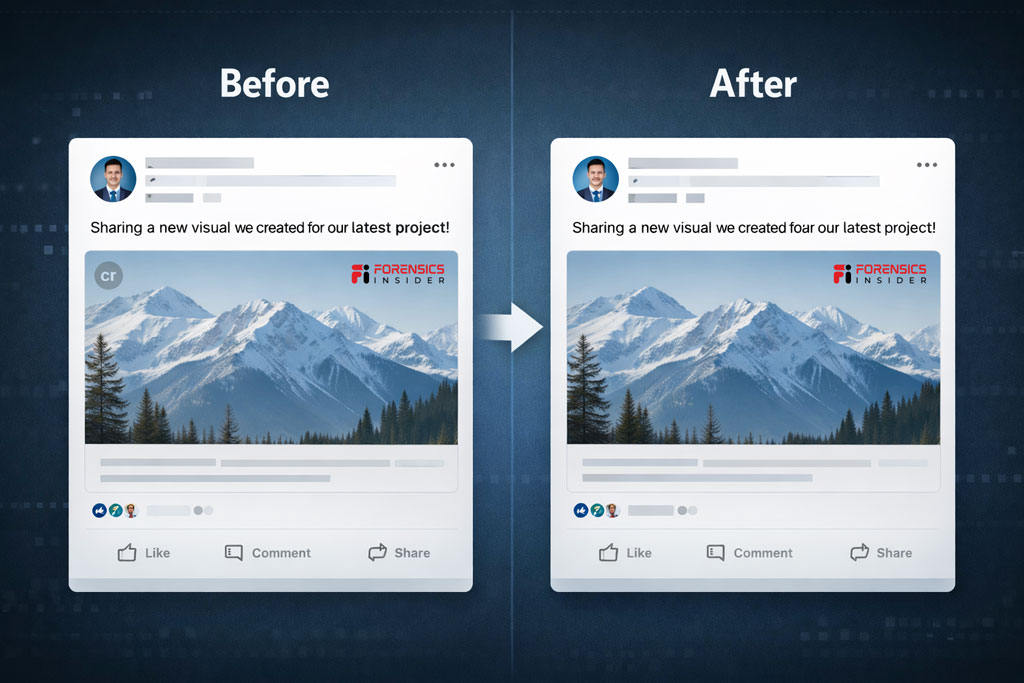
This is part of a broader push across platforms to increase transparency around synthetic media. Some companies rely on metadata tagging. Others experiment with watermarking or pattern recognition models.
What this means is simple. The seal appears because the file tells LinkedIn where it came from.
If you want to avoid AI generated image detection triggered by metadata, you need to understand what information is attached to your file before you upload it.
Easy Method: Using a Metadata Remover Tool
If you want a fast, no technical hassle method to remove AI generated seal, a Metadata Remover Tool is the simplest route.
Here’s what these tools actually do.
They strip embedded metadata from the image file. That includes software signatures, generator identifiers, timestamps, and other hidden properties. The visible image remains untouched. Only the invisible layer is cleaned.
Think of it like removing a product tag before gifting something. The item stays the same. The label disappears.
How It Works
- You upload the image to the tool.
- The Image Metadata Remover Tool removes metadata fields.
- You download the cleaned version.
- You upload that version to LinkedIn.
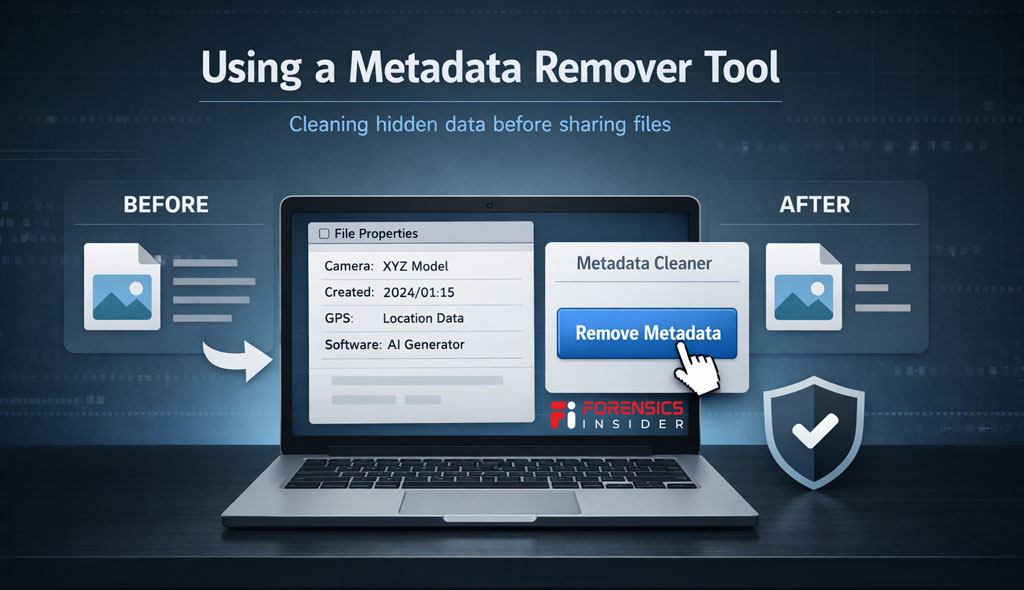
Because the AI source signature is no longer embedded, this often helps avoid AI generated image detection that relies purely on metadata scanning.
If you prefer a quick solution without installing software, you can use a free online metadata remover such as the one available on ForensicsInsider. It processes the file and removes hidden properties before you post.
A few things to keep in mind
- The image quality does not change.
- The design remains identical.
- Only file properties are modified.
This method works well when the platform badge is triggered by metadata fields. It will not override advanced detection systems that analyze pixel patterns or watermarking structures.
But for most metadata based seals, this approach gives you control in minutes.
How to Hide AI Generated Images Seal Before Uploading?
Let’s get practical.
If you want to Hide AI Generated Images Seal, the key is simple. You do it before the image ever touches LinkedIn.
Once the file is uploaded, the platform has already scanned the metadata. So the control point is your system, not theirs.
Here’s what you need to understand first.
An image has two layers
The visible pixels
The invisible metadata
The seal usually comes from that invisible layer. So your goal is not to change the design. It is to modify or remove the embedded source information.
Step 1
Check the file properties
Right click the image and view its details. On many AI generated images, you will see references to the generating tool. That is the trigger.
Step 2
You have two common methods
Open the image in an editor like Photoshop and export it again. When you re save it, the metadata typically updates to show the editing software instead of the original AI source.
Or use a metadata removal tool to strip embedded data before uploading. This removes the generator signature completely.
Both approaches are commonly used by professionals who want to avoid AI generated image detection that relies on file metadata.
Step 3
Upload the cleaned version
After cleaning, upload the new file to LinkedIn. In many cases, the platform no longer displays the AI source seal because the identifying metadata is no longer present.
Important to remember
This works when the platform depends on metadata signals. If future systems rely on advanced pixel level AI detection, metadata cleaning alone may not be enough.
But right now, understanding this simple file layer gives you control.
It is not about tricking a system. It is about knowing how digital files communicate information and deciding what you want that file to say about your work.
Editing and Re Saving Images in Photoshop
If you already use design software, this method feels natural.
Instead of relying on a separate tool, you can open the AI generated image inside Photoshop or any professional image editor and export it again. Many creators use this approach when they want to avoid AI generated images badge on uploading Linkedin without adding extra workflow steps.
Here’s what happens behind the scenes.
When an AI tool creates an image, it embeds its own metadata signature. But when you open that file in Photoshop and re save or export it, the software rewrites the metadata layer. In most cases, the new file will show Adobe Photoshop as the editing application instead of the original AI generator.
The pixels remain the same.
The digital label changes.
How to Do It?
- Open the image in Photoshop.
- Use Save As or Export.
- Choose standard JPG or PNG format.
- Save the file and check properties before uploading.
You will often see that the metadata now reflects Photoshop as the source. This simple step can help avoid AI generated image detection that relies on embedded generator identifiers.
One important note.
Use Export or Save As rather than simply renaming the file. Renaming does nothing to metadata. The actual re save process is what refreshes file properties.
This method works well for professionals who already refine lighting, color grading, or composition before posting. It blends naturally into your editing workflow.
Just remember. This approach modifies metadata signals. It does not guarantee bypassing advanced AI recognition systems if platforms expand detection beyond file properties.
Do Other Platforms Use AI Badges Too
Yes. LinkedIn is not the only place experimenting with identifying synthetic content. Across social media and content platforms, companies are exploring ways to signal when visuals are created or heavily influenced by AI.
Some rely on metadata. Others layer in pattern analysis or watermark detection. Here’s a snapshot of what’s happening.
Instagram and Facebook
Meta has discussed transparency measures that could label AI generated media. In some tests, platforms may show badges or contextual prompts when synthetic visuals are detected or submitted. Metadata can play a role, but pattern based detection models are also in development.
Twitter (X)
There have been discussions about warning labels on AI generated media circulating on timelines. These systems look at a combination of metadata and pixel level cues.
Stock Image Platforms
Many royalty free marketplaces now flag AI generated assets or restrict their use. Some embed badges in search results or require creators to indicate generation methods at upload. Metadata tags help power these filters.
Messaging and Collaboration Tools
Certain enterprise platforms add indicators when pasted content matches known AI signatures. These are usually internal governance features rather than public facing labels.
What this all means is two fold.
First, metadata based badges — like the one you see on LinkedIn — are only one form of detection. They’re triggered when the file tells the platform where it came from.
Second, as AI detection evolves, platforms may rely less on metadata and more on models that analyze patterns in the visual content itself.
For now, if you want to avoid AI generated image detection on platforms that depend heavily on metadata signals, cleaning or rewriting metadata is effective. Just be aware that future detection systems may add layers beyond file properties.
This is not about tricking a system. It’s about understanding how platforms interpret digital files and planning your workflow accordingly.
Ethical and Professional Considerations
When you work with AI images, the technical side is only half the story. The bigger question is trust.
If you are in digital forensics or marketing, you already know this. Credibility compounds slowly and disappears fast.
Transparency builds authority
In professional environments, especially on platforms like LinkedIn, perception matters. If an image is AI generated and you present it as real photography, that can raise questions about authenticity. Not because AI is wrong, but because context was hidden.
For thought leadership posts, creative illustrations, or conceptual visuals, disclosure often strengthens your position. It shows confidence rather than concealment.
Legal and compliance risks
In regulated sectors like finance, law, cybersecurity, and digital forensics, undisclosed synthetic media can create compliance issues. If an image implies evidence, documentation, or a real event, clarity becomes critical.
Altering metadata is technically simple. But in evidentiary contexts, modifying file properties can undermine admissibility or credibility. That distinction matters.
Brand integrity
For marketers, consistency matters more than perfection. If your audience believes your visuals reflect real outcomes, staged AI imagery without context can dilute brand trust over time.
On the other hand, clearly labeled AI illustrations used for conceptual storytelling are widely accepted and often appreciated.
Intent matters
There is a difference between
- Cleaning metadata for aesthetic reasons
- Standardizing export workflows
- Intentionally disguising the origin of synthetic media
The first two are workflow choices.
The third can become an ethical issue depending on context.
The practical takeaway
Use AI as a tool.
Be clear about purpose.
Align with your professional standards.
In high trust industries, transparency usually works in your favor. In creative industries, clarity avoids backlash.
Technology evolves. Reputation still runs on human judgment.
Final Takeaway
AI generated images are not the problem. Misalignment between intent, presentation, and platform rules is.
Platforms like LinkedIn use metadata signals to improve transparency. That seal is usually triggered by embedded creation data, not by some advanced visual analysis of your image.
Here’s what really matters
- If you understand how metadata works, you control your workflow.
- If you understand how platforms interpret files, you avoid surprises.
- If you understand the ethical layer, you protect your credibility.
For professionals, especially in fields built on trust, clarity beats cleverness every time.
Use AI intentionally.
Edit and export responsibly.
Disclose when context demands it.
At the end of the day, tools evolve. Reputation does not.