The first time you handle a seized hard drive, it feels heavier than it should. Not because of the hardware. Because of what it might contain.
You cannot afford mistakes. Opening files directly, booting the system, or even plugging it in the wrong way can change evidence. And once digital evidence changes, credibility disappears with it.
This is where the E01 File in Forensics becomes essential. Instead of examining the original device, investigators create a precise forensic image. That image, often saved as a Forensics Disk Image File, acts as a protected working copy.
Think of it like casting a mold of a footprint at a crime scene. You do not analyze the ground itself. You analyze the cast.
In digital investigations, that cast is commonly an E01 file. It preserves data exactly as it existed at the time of acquisition, complete with verification hashes and embedded metadata.
Understanding how this works is not optional if you are serious about forensic integrity. It is foundational.
What is an E01 File?
Let’s simplify it.
An E01 File in Forensics is a specialized forensic image format used to store an exact copy of a digital storage device. Not just visible files. Not just documents and photos. Everything.
It captures data at the sector level. That means active files, deleted files, hidden partitions, slack space, and even fragments that normal users never see.
Think of a hard drive like a book. A regular copy grabs only the readable pages. An E01 capture scans every page, including the erased pencil marks and blank margins.
Technically, this format is a structured Forensics Disk Image File that preserves the entire state of a device at a specific moment in time. It also stores important metadata such as
- Case details
- Examiner information
- Acquisition date
- Hash values for integrity verification
Those hash values are critical. They act like digital fingerprints. If even one bit changes inside the image, the hash changes. That is how investigators prove the image has not been altered.
The E01 format also supports compression and segmentation. Large drives can be split into multiple parts while maintaining integrity. This makes storage and transfer more practical without sacrificing accuracy.
At its core, the E01 File in Forensics is about preservation. It allows investigators to analyze evidence safely while the original device remains untouched and sealed.
And in digital investigations, preservation is everything.
How an E01 File is Created?
Creating an E01 File in Forensics is not just copying data. It is a controlled, documented process designed to preserve evidence exactly as it exists.
Let’s walk through it step by step.
First, the original storage device is connected through a write blocker. This hardware ensures nothing can be written back to the drive. No accidental system changes. No hidden background updates. The device becomes read only.
Next comes imaging. A forensic acquisition tool reads the drive sector by sector. It does not look at file names or folders. It reads raw data blocks directly from the storage surface. Every bit is captured into a structured Forensics Disk Image File in E01 format.
During this process, hash values are calculated. These are cryptographic fingerprints, usually MD5 or SHA variants. The hash of the original drive is generated first. After the imaging process completes, the hash of the newly created E01 File in Forensics is calculated again.
After hash value analysis, if both hashes match, the copy is verified as exact.
The imaging software also allows examiners to add metadata. Case number. Investigator name. Notes. Date and time of acquisition. This documentation becomes embedded inside the Forensics Disk Image File itself.
In many cases, the image is compressed and split into segments. This makes storage and transfer easier without altering the underlying data.
Once imaging is complete and hashes are verified, the original device is sealed and stored securely. From that point forward, all analysis happens on the E01 image, not the original hardware.
That separation is critical.
The E01 File in Forensics exists so investigators can work freely while preserving the original evidence in an untouched state.
What Makes It Different from a Normal Copy?
At first glance, it sounds simple.
Why not just copy the files and move on?
Here’s the problem. A normal copy only grabs what the operating system can see. Documents. Photos. Videos. Active folders.
An E01 File in Forensics goes much deeper. It does not rely on the file system view. It reads the storage device sector by sector. That means it captures deleted files, unallocated space, slack space, hidden partitions, and fragments that standard copy methods ignore.
Think of it this way. A normal copy is like photographing the furniture in a room. An E01 capture is like scanning the entire structure, including what is behind the walls.
Another key difference is verification. A drag and drop transfer has no built in integrity check. If something changes during copying, you may never know.
A Forensics Disk Image File includes hash verification. Before and after imaging, cryptographic hashes are calculated. If even one bit differs, the hash will not match. That is how investigators prove the image is an exact replica.
There is also documentation. An E01 File in Forensics can embed acquisition details such as examiner name, date, and case number. A normal copy carries none of that evidentiary context.
Most importantly, a simple copy does not preserve deleted data in a recoverable state. Once files are removed at the file system level, they may not appear in a standard backup. A Forensics Disk Image File preserves the entire disk surface at that moment in time.
That is the difference.
One method moves files.
The other preserves evidence.
Structure of an E01 File
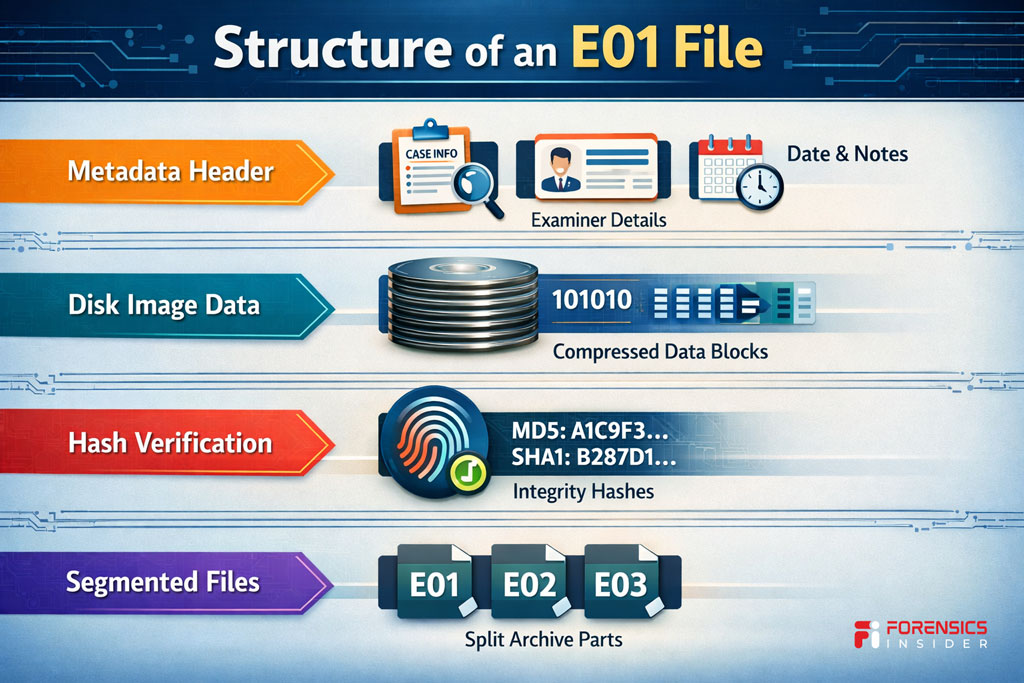
An E01 File in Forensics is more than a single blob of copied data. It is structured. Organized. Designed for evidentiary reliability.
At its core, it contains a sector by sector image of the original storage device. Every readable block from the disk is captured and stored inside the file. That includes active data, deleted areas, and unallocated space.
But what makes it different from a raw image is the additional structure layered around that data.
First, there is a header section. This stores metadata such as
- Case number
- Examiner details
- Acquisition date and time
- Notes entered during imaging
This information becomes part of the Forensics Disk Image File, helping maintain documentation integrity from the start.
Next comes the data blocks. The raw disk content is stored in compressed chunks. Compression reduces file size without altering the underlying evidence. Each block is indexed so forensic tools can navigate efficiently during analysis.
Another critical component is hash information. The E01 File in Forensics includes verification values generated during acquisition. These hashes act as digital fingerprints. When the image is later opened or validated, the system recalculates hashes to confirm nothing has changed.
Large images can also be segmented. Instead of one massive file, the image may be split into multiple numbered parts. Together, they reconstruct the full forensic image while making storage and transfer more manageable.
- So the structure is layered
- Metadata for documentation
- Data blocks for disk content
- Hash values for integrity
- Optional segmentation for practicality
That architecture is what turns a simple disk copy into a defensible forensic artifact.
How Investigators Use It in Real Cases?
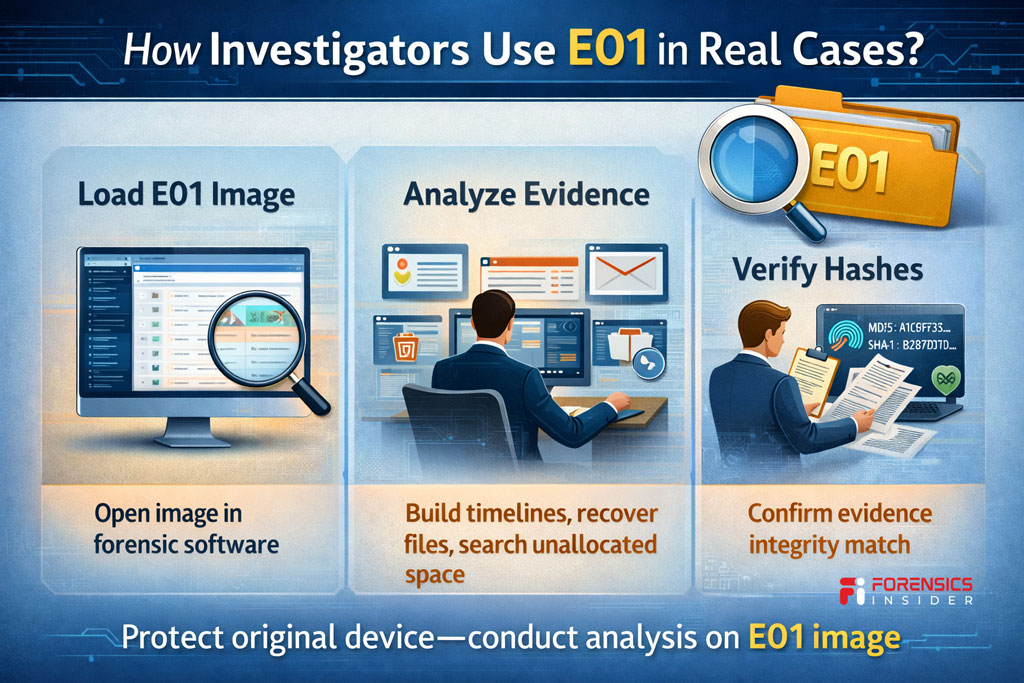
Once the imaging process is complete, the original device is sealed. From that point forward, analysis happens on the E01 File in Forensics, not the physical drive. That separation protects evidence from accidental alteration.
In a real case, the examiner loads the Forensics Disk Image File into forensic software. The image can be mounted in read only mode so it behaves like a live disk, but without any risk of modification.
From there, the workflow begins.
Investigators build timelines.
They recover deleted files.
They examine browser history, system logs, registry entries, and application artifacts.
Because the E01 File in Forensics preserves the full disk surface, analysts can search unallocated space for remnants that a normal file copy would never capture. That often becomes critical when users attempt to delete incriminating data.
Another important use is verification. At various stages of the investigation, the hash value of the Forensics Disk Image File is recalculated. If the hash matches the original acquisition value, the integrity of the evidence is confirmed.
In court, this matters. An examiner can testify that all findings were derived from a verified forensic image, not from direct interaction with the original device. The hash consistency supports that claim.
Chain of custody also becomes easier to manage. Instead of passing around the physical drive, labs duplicate the E01 File in Forensics and work on verified copies. Each copy can be validated against the original hash.
In practice, the file becomes the working foundation of the case.
The hardware is stored.
The image is examined.
The integrity is preserved.
That disciplined separation is what allows digital evidence to stand up under scrutiny.
Advantages and Limitations
No format is perfect. The E01 File in Forensics has clear strengths, but it also comes with practical considerations. Understanding both sides makes you a stronger examiner.
Advantages
Built in Integrity Verification
Every Forensics Disk Image File includes hash values generated during acquisition. These act as digital fingerprints. If the image changes, the hash changes. That makes integrity checks straightforward and defensible.
Embedded Metadata
Case details, examiner notes, and acquisition timestamps can be stored inside the E01 structure. This keeps documentation tied directly to the evidence file instead of scattered across separate records.
Compression Support
The format allows compression without altering the original data. Large drives become more manageable to store and transfer.
Wide Industry Acceptance
Courts, law enforcement units, and corporate labs commonly recognize the E01 File in Forensics as a standard forensic imaging format. That familiarity supports admissibility discussions.
Limitations
Tool Dependency
A Forensics Disk Image File in E01 format requires compatible forensic software. It is not something you casually open like a ZIP file.
Proprietary Origins
Although widely supported, the format was originally proprietary. That means understanding tool compatibility and version support still matters.
Storage Size
Even with compression, full disk images can be large. Imaging multi terabyte drives results in significant storage requirements.
Process Still Matters
The format itself does not guarantee correctness. If the imaging procedure is flawed, the E01 File in Forensics will faithfully preserve that mistake. Integrity depends on methodology, not just file type.
Here is the balanced view.
The E01 format is powerful because it combines preservation, verification, and documentation in one structured container. But it remains a tool. Its reliability depends on disciplined acquisition, careful validation, and proper chain of custody.
Handled correctly, it strengthens a case.
Handled carelessly, it only records the error.
Tools That Open and Analyze E01 Files
An E01 File in Forensics is not meant to be opened like a normal document. It requires specialized forensic software designed to mount, parse, and analyze sector level disk images safely.
Here are the tools commonly used in professional labs.
EnCase
EnCase originally developed the E01 format, so it natively supports deep analysis of this Forensics Disk Image File structure. Investigators can mount the image, recover deleted files, build timelines, and generate court ready reports directly from the E01 container.
FTK
FTK allows examiners to load an E01 File in Forensics and perform indexing, keyword searches, registry analysis, email parsing, and artifact recovery. It also verifies hash values to confirm evidence integrity before analysis begins.
Autopsy
Autopsy supports importing a Forensics Disk Image File and examining file systems, web artifacts, deleted content, and metadata. It is widely used in academic and investigative environments.
X-Ways Forensics
X Ways provides efficient low level analysis of E01 images. Many investigators prefer it for manual artifact validation and deep file system inspection.
Arsenal Image Mounter
This tool allows mounting an E01 File in Forensics as a read only disk in Windows. Once mounted, it behaves like a physical drive while preserving integrity. That makes certain types of analysis more flexible.
In practice, the workflow usually looks like this
- Verify hash values of the Forensics Disk Image File.
- Mount or load the image in forensic software.
- Perform structured analysis on the image, not the original drive.
- Re verify hashes when needed.
The key principle remains constant.
You never analyze the original hardware once imaging is complete.
You analyze the E01 image.
The tool helps you explore the data. The methodology ensures the findings remain defensible.
Best Practices When Handling Forensic Disk Images
Creating a solid image is only half the job. Handling it correctly is what protects your credibility. A Forensics Disk Image File is powerful, but only when managed with discipline.
Here’s how professionals treat it.
Verify Hashes Immediately
The moment an E01 File in Forensics is created, confirm the hash values match the source device. Do it again before analysis. Do it again before court submission.
Hash consistency is your integrity anchor. If the values match, your evidence is intact. If they do not, stop and investigate.
Never Work on the Original Device
Once imaging is complete, seal the original hardware. Store it securely. All examination should happen on the forensic image or on verified duplicates of that image.
The E01 File in Forensics exists to protect the source. Respect that boundary.
Maintain Clear Documentation
Every action should be logged.
Who accessed the image?
When it was accessed?
What tools were used?
What hash values were verified?
Chain of custody is not paperwork theater. It is what keeps evidence admissible.
Use Read Only Mounting
When loading a Forensics Disk Image File, ensure the tool mounts it in read only mode. The analysis environment should never alter the image.
Even accidental write operations can compromise defensibility.
Secure Storage
Store E01 images on controlled access systems. Use encrypted storage when appropriate. Maintain backup copies, each verified against the original hash.
Large cases may involve multiple terabytes. Plan storage capacity early.
Re Validate Before Reporting
Before generating final reports, re calculate hash values of E01 File in Forensics. Confirm nothing changed during analysis.
It takes minutes. Protects months of work.
At the end of the day, the format itself does not guarantee reliability. Process does.
A forensic image is only as trustworthy as examiner handling it.
Stay methodical. Stay documented. And Stay verifiable.
Final Takeaway
Digital evidence is fragile. One wrong move can change timestamps, overwrite data, or weaken a case before it even begins.
That is why the E01 File in Forensics matters. It gives investigators a controlled, verifiable way to preserve a device exactly as it existed at the moment of acquisition. Not just files. The entire disk surface.
A Forensics Disk Image File in E01 format is more than storage. It combines raw sector data, embedded metadata, and hash verification into a structured evidence container. That structure is what makes it defensible.
But here is the important truth. The format alone does not guarantee integrity. The process does.
Use a write blocker.
Verify hashes.
Document every step.
Work only on the image.
Handled correctly, an E01 File in Forensics becomes the foundation of reliable digital investigation. It preserves a moment in time and allows analysis without compromising the original source.
In forensic work, trust is everything.
And trust is built on preservation, verification, and disciplined handling.